

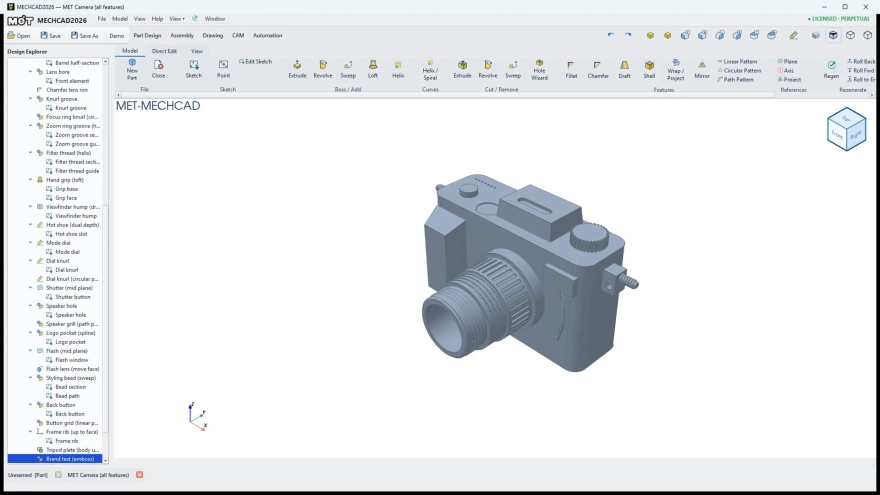
MECHCAD is a mechanical CAD editor for Windows that focuses on creating and refining technical drawings in a desktop workspace. Its purpose is practical rather than decorative: the program is suited to preparing part layouts, checking geometric relationships and building clear documentation for mechanical projects.
MECHCAD can be considered an alternative to AutoCAD for users who need a focused mechanical drafting environment without committing to a commercial license. Like AutoCAD, it is intended for precise CAD work rather than freehand illustration; however, MECHCAD has a narrower scope and does not replace the full range of AutoCAD’s professional toolsets, integrations and specialized workflows.
MECHCAD Features
- Creates mechanical drawings in a Windows desktop environment.
- Provides a dedicated workspace for drafting and editing engineering geometry.
- Helps arrange design elements into readable technical layouts suitable for further review.
- Can be used for part concepts, workshop drawings and other small mechanical projects.
- Is distributed through the project’s GitHub releases, making the software and its updates easy to locate.
MECHCAD is best suited to tasks where the drawing itself is more important than a large ecosystem of add-ons: a small mechanism, a component outline or a preliminary production sketch can be kept in one focused application.
Advantages of the CAD editor
- Free distribution removes the subscription cost associated with many commercial CAD products.
- The mechanical focus keeps the program relevant to technical drawing instead of overwhelming a small project with unrelated design tools.
- A desktop Windows workflow is convenient for offline work in a workshop, classroom or engineering office.
- The GitHub release page provides a clear source for obtaining the application and following project updates.
- MECHCAD can serve as a starting point for users who need a dedicated CAD environment before moving to a larger professional package.
Disadvantages
- MECHCAD has a smaller ecosystem than AutoCAD, so extensive add-ons, enterprise integrations and established training materials should not be expected.
- The program is not a universal replacement for advanced commercial CAD suites used in complex production workflows.
- Its GitHub-based distribution may feel less familiar to users who prefer software delivered through a polished application store.
- Projects that depend on a broad range of specialized engineering modules may require additional software.
The program’s main limitation follows from its main idea: MECHCAD is a focused CAD tool, not an all-purpose engineering platform. That makes it easier to position for compact drafting jobs, while larger collaborative projects may call for a more extensive solution.
MECHCAD is designed for those who want a focused Windows tool for mechanical drafting without the expense of a commercial CAD package. It fits preliminary design work, educational tasks and smaller engineering drawings, while users with demanding enterprise requirements may prefer a mature professional platform. MECHCAD is distributed free of charge.
What's new in the latest version 2026.6.27
Updated
- Improved the reliability of opening and saving CAD projects.
- Enhanced viewport performance when working with complex models.
- Improved compatibility when importing and exporting standard CAD file formats.
- Fixed several issues affecting drawing display, editing operations, and application stability.










Add comment